AI Assistant
Get instant legal guidance, draft documents, review content, and answer legal queries directly within the platform.
What can the AI Assistant do?
The AI Assistant in OctoGenie helps users get instant legal guidance, draft documents, review content, and answer legal queries directly within the platform, improving productivity and efficiency.
Features & Capabilities of the AI Assistant
The AI Assistant offers three main features:
- Q&A: Used to ask questions and get instant answers related to legal matters, procedures, and legal terms.
- Draft: Used to create legal drafts such as notices, applications, replies, and other legal documents.
- Analysis: Used to review and analyze legal documents to identify key points, risks, and important insights.
How to Ask Legal Questions (Q&A)
Get quick answers to legal questions
Asking Legal Questions (Q&A)
The Q&A feature in the OctoGenie AI Assistant is used to get quick answers to legal questions related to matters, procedures, and terms.
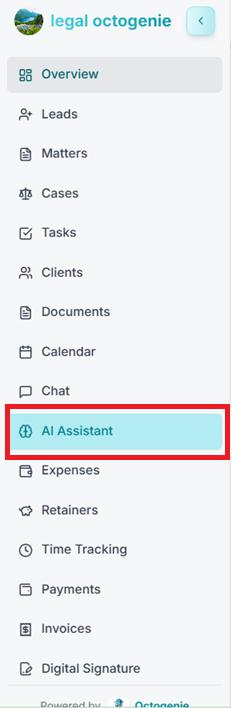
Access AI Assistant
Log in to the OctoGenie platform. From the left-hand menu, click on 'AI Assistant'.
Opens in a new tab • partner.octogenie.com/
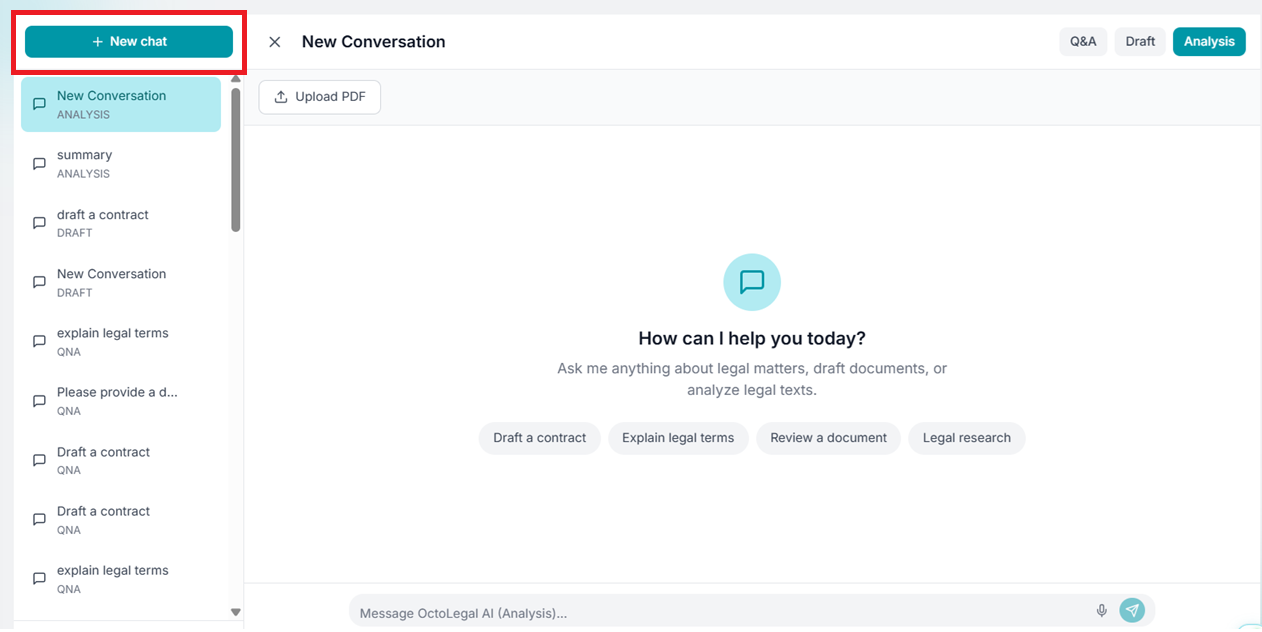
Start New Chat
Click '+ New Chat' to start a new interaction session.
Opens in a new tab • partner.octogenie.com/ai-assistant
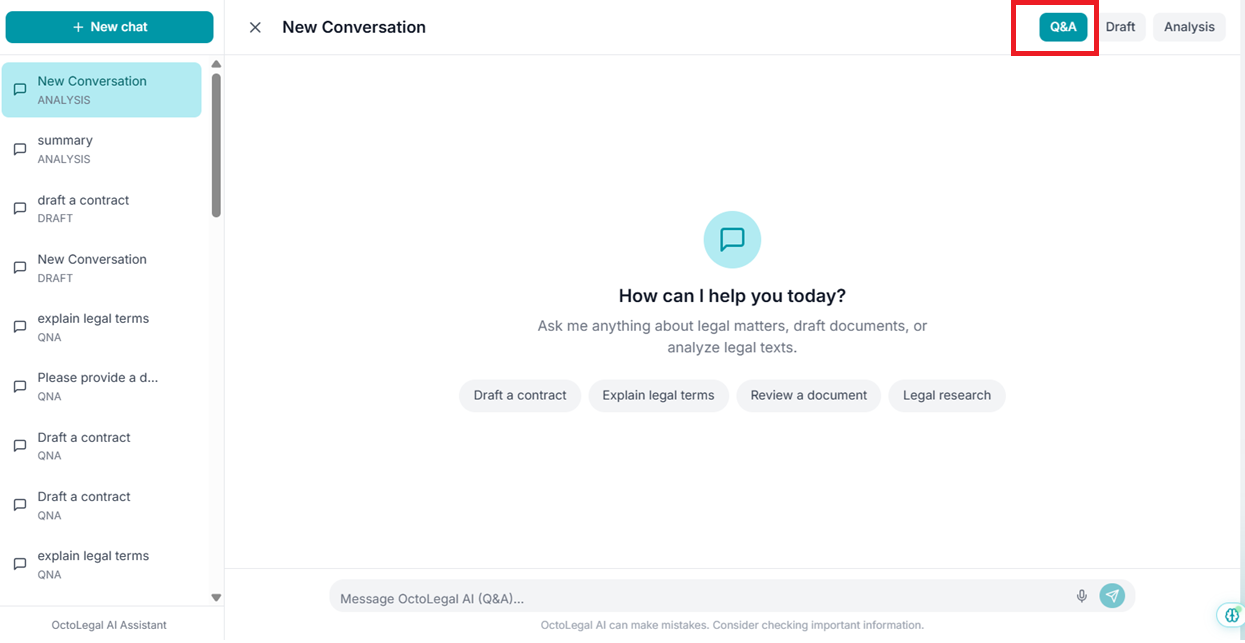
Select Q&A Mode
Click on the 'Q&A' option available at the top-right corner of the AI Assistant screen.
Opens in a new tab • partner.octogenie.com/ai-assistant
Enter Your Question
Type your legal query in the message box. Example: 'How can I verify if there are any litigations against a property?'
Opens in a new tab • partner.octogenie.com/ai-assistant
Review Answer
Click the Send icon. The AI provides structured, easy-to-understand answers instantly.
Opens in a new tab • partner.octogenie.com/ai-assistant
Expected Outcome
You receive instant, structured legal guidance and procedural answers.
You're all set!
You receive instant, structured answers to your legal questions.
How to Draft Documents with AI
Create legal documents quickly
Drafting Documents with AI
Use the Draft feature to create legal drafts such as notices, applications, and letters efficiently.
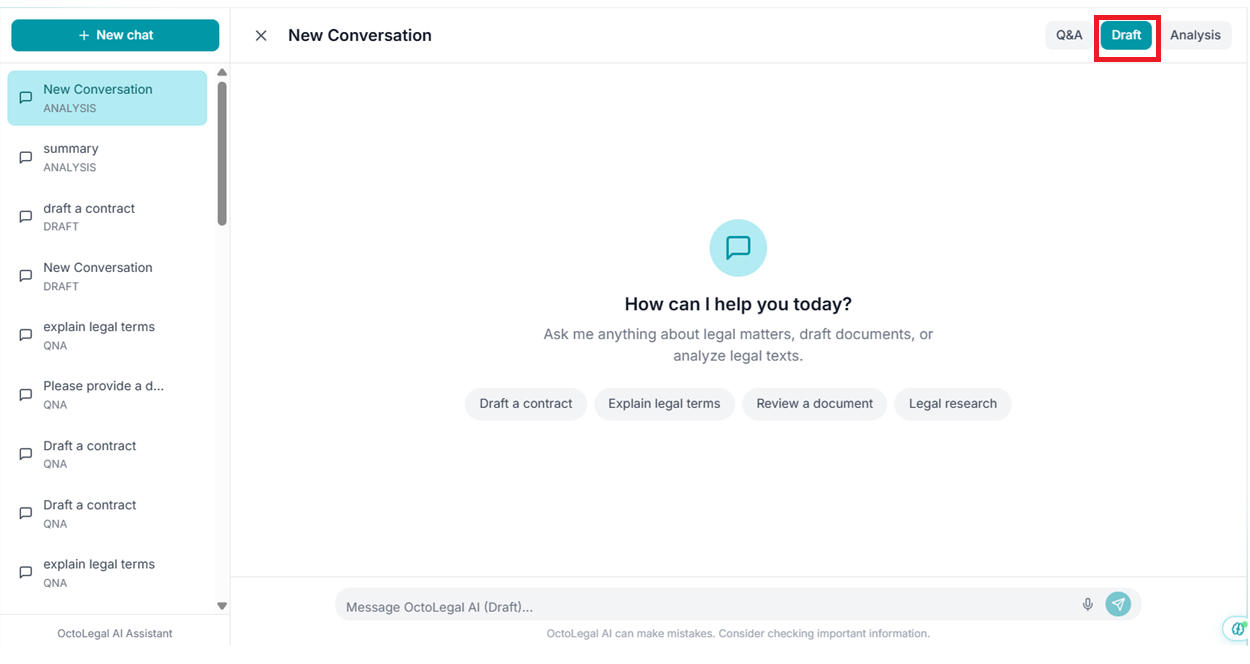
Navigate and Start
Go to AI Assistant and click '+ New Chat'. Select the 'Draft' option from the top-right corner filters.
Opens in a new tab • partner.octogenie.com/ai-assistant
Enter Drafting Requirement
State what document you need. Example: 'Draft a legal notice for non-payment of dues.'
Opens in a new tab • partner.octogenie.com/payments
Generate Draft
Click the Send icon and review the AI-generated draft displayed on your screen.
Opens in a new tab • partner.octogenie.com/ai-assistant
Listen to Content
Use the 'Listen' option on the bottom-left side to hear the drafted content read aloud.
Opens in a new tab • partner.octogenie.com/ai-assistant
Download as PDF
Click 'Download PDF' (available on the bottom-left) to save the draft for offline sharing or record-keeping.
Opens in a new tab • partner.octogenie.com/ai-assistant
Edit Requirement
You can draft various types: Legal notices, Contracts, Petitions, Replies, or Explanations.
Opens in a new tab • partner.octogenie.com/ai-assistant
Finalize and Use
Edit or customize the draft as required before final use in your practice.
Opens in a new tab • partner.octogenie.com/ai-assistant
Expected Outcome
A complete legal document ready for professional review and customization.
You're all set!
You have a complete legal document draft ready for review and customization.
How to Analyze Documents
Review and analyze legal documents
Analyzing Documents (Analysis)
Identify key points, risks, and observations in PDF documents accurately and quickly.
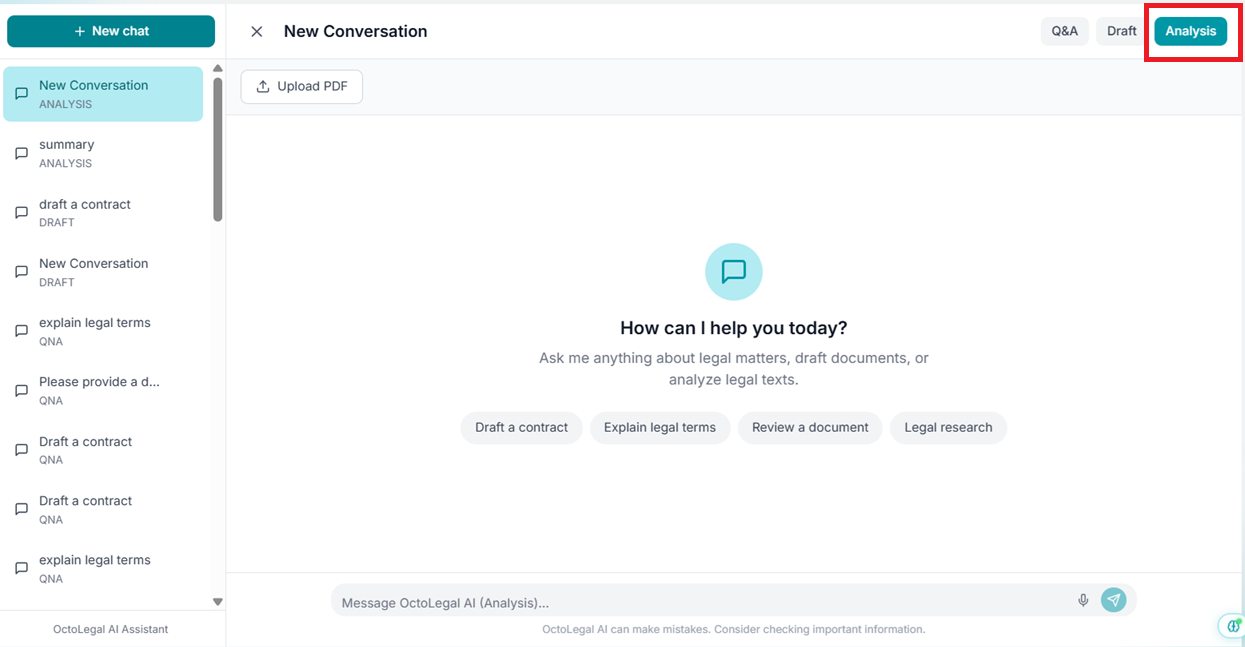
Enter Analysis Mode
In the AI Assistant module, click '+ New Chat' and select the 'Analysis' tab at the top-right.
Opens in a new tab • partner.octogenie.com/ai-assistant
.png&w=3840&q=75)
Upload PDF
Click 'Upload PDF' and select the document you want to analyze from your system.
Opens in a new tab • partner.octogenie.com/documents/upload
Enter Analysis Request
Type your request: 'Summarize this document', 'Identify key clauses', or 'Explain legal terms used'.
Opens in a new tab • partner.octogenie.com/documents
Generate Insights
Click Send. The AI Assistant analyzes the document for summaries, key clauses, and risks.
Opens in a new tab • partner.octogenie.com/documents
Review Results
Review structured insights: Document summary, Key clauses/sections, and Risks or red flags.
Opens in a new tab • partner.octogenie.com/documents
Refine Analysis
Ask follow-up questions for deeper insights or compare clauses to support decision-making.
Opens in a new tab • partner.octogenie.com/ai-assistant
Final Result
Benefit from reduced manual effort and improved accuracy in document review.
Opens in a new tab • partner.octogenie.com/documents
Expected Outcome
Comprehensive understanding of complex legal texts with highlighted risks.
You're all set!
You receive comprehensive analysis of the document with key insights, risks, and important observations.